Changelog

New updates and improvements to Out Plane.


NEW FEATURE

Otto, the AI Agent in the Console

Describe what you want in plain language and Otto does it. Otto is the operations agent built into the Out Plane console. It works through the same API the console itself uses, under your own permissions, so it can only do what you could already do by hand.

Ask Otto

Ask, and it works out the details

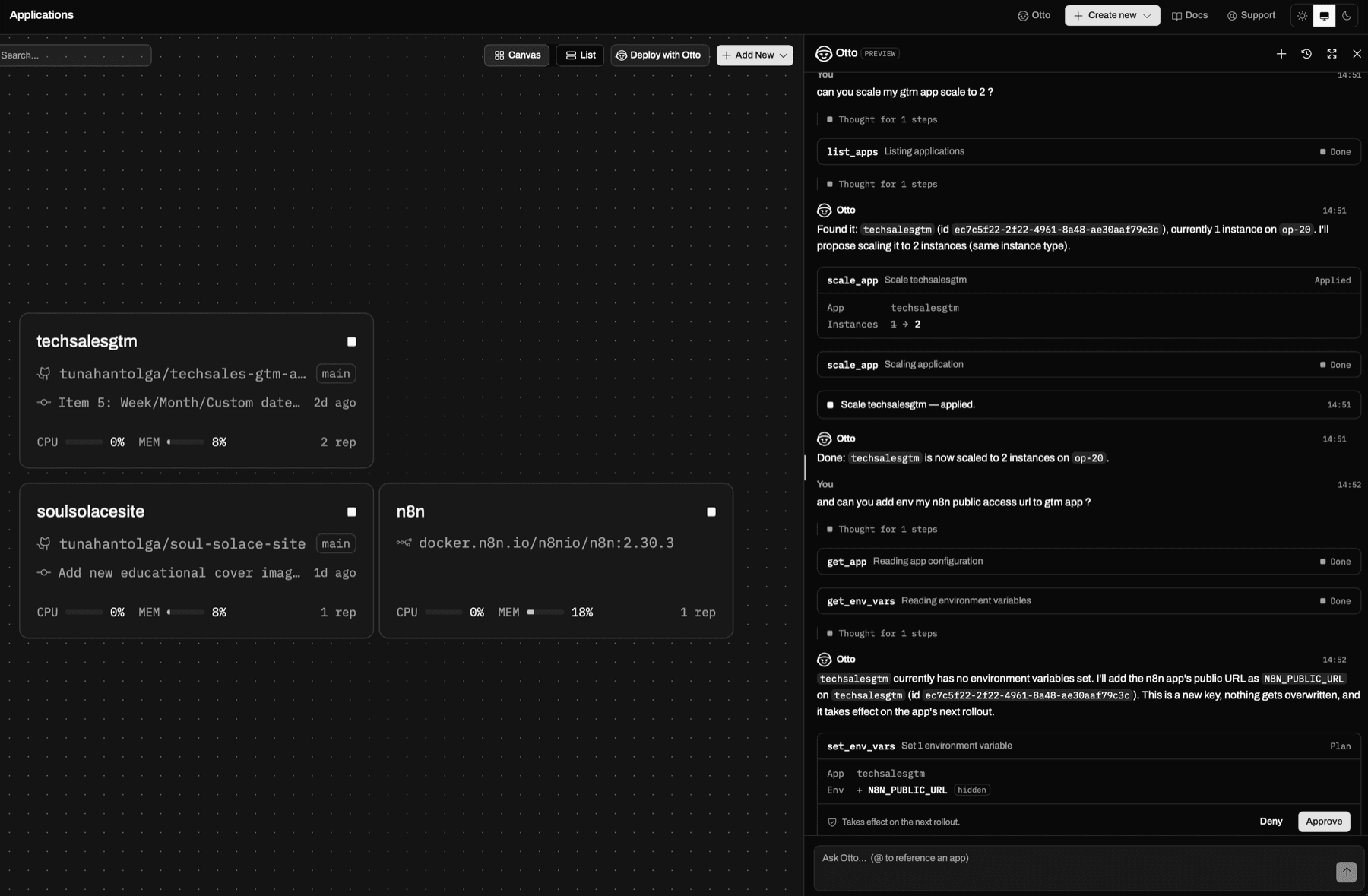
Tell Otto to scale your api app and it finds the app, reads its current state, and comes back with the actual numbers. It resolves names to resources on its own and reads across apps, databases, deployments, volumes, environment groups, IP profiles, and domains. When it needs evidence it pulls runtime logs, build logs, and CPU, memory, network, and disk metrics. Type @ in the composer to point it at a specific app or database.

Every change is a plan you approve

Otto never writes on its own. When it proposes a change it renders an approval card showing exactly what will happen in product terms, such as instance count going from 2 to 3, and the change runs only after you press Approve. Reads run freely, writes wait for you, and Otto has no way to delete an app or a database and no shell access.

Otto scaling an app, then proposing an environment variable for approval

Grounded in the platform

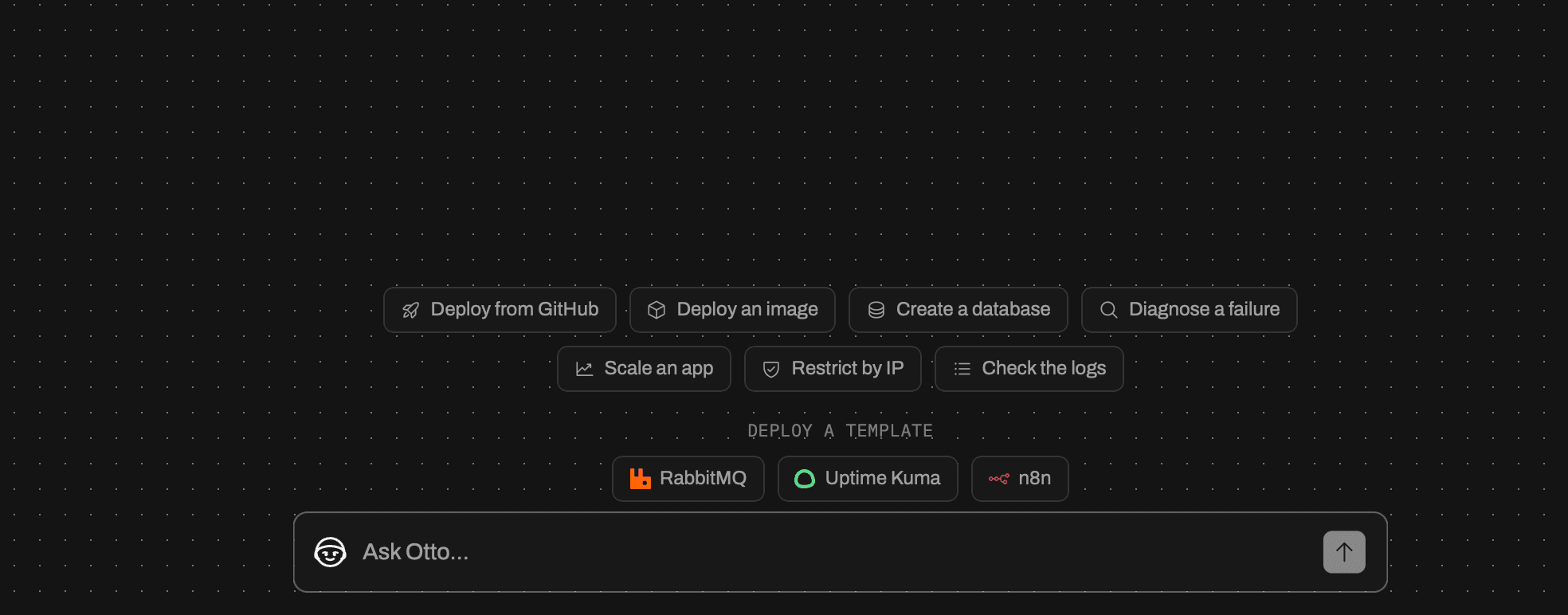
Otto searches the Out Plane documentation before answering questions about plans, limits, and how a feature works, so answers reflect the platform instead of a guess. It opens with one-click prompts for the common jobs: deploy from GitHub, deploy an image, create a database, diagnose a failure, scale an app, restrict by IP, and check the logs.

Available now in preview

Otto is in preview, with a monthly message allowance that depends on your plan. Conversations are saved, so you can reopen an earlier thread from the history menu at any time.

Open the console and ask Otto something.

NEW FEATURE

The New Out Plane Console

We rebuilt the Out Plane console from the ground up: faster, fully keyboard-navigable, and built around your apps. Navigation is instant, with no full-page refreshes, and observability is built in.

Instant, no refresh

Client-side routing with smart caching means you move between apps, settings, and observability with zero page reloads. Data refreshes quietly in the background, so the screen is never blank.

Observability, built in

Live-tailing runtime logs with a one-second tail, structured HTTP logs (method, status, path, latency), and CPU, memory, network, and disk metrics. Everything is filtered with simple dropdowns, with no query language to learn.

A clearer way to ship

Create an app from a GitHub repo, a public Git URL, or a prebuilt image, then configure build and scale, set environment variables, and expose ports in one modular flow. Settings are split by concern (General, Build, Scale, Environment, and Network) with explicit Save and Save and deploy, so you decide exactly when a change triggers a rebuild.

Open the console to take a look.

NEW FEATURE

Persistent Volumes

Give your stateful apps durable disk with Persistent Volumes, dedicated block storage that attaches to a single application and survives restarts, redeploys, and image changes.

Durable block storage

Each volume is a dedicated block device, mounted read-write at the path you choose, such as /data. Pick any size from 10 GB to 50 GB per volume. Your data persists across every deploy, so databases, queues, and file stores keep their state between releases.

Attach at create, or any time after

Create a volume up front and mount it when you create an app, or add one to an existing app and mount it at any path. Detaching a volume never deletes its data, so you can move a disk between apps without losing a byte.

Built for stateful workloads

An app with a volume runs as a single instance, so your data always has one writer. Stateless apps keep scaling horizontally exactly as before.

Volumes are available on the Pro plan, with 100 GB of total volume storage per team. Open any app and find the Volumes section to create your first one.

NEW FEATURE

Browser Terminal

Debug a running app without SSH keys or a bastion host. The Browser Terminal opens an interactive shell straight into any running instance, right from the console.

Exec into a running instance

Get a live shell to inspect the filesystem, check processes, or run a quick migration, with output streaming back as you type. No SSH keys, no jump host, no extra setup.

Pick your instance and shell

Choose which instance to attach to and which command to run: sh by default, or bash, zsh, or anything in your image. The terminal follows your window size and reconnects in a click if the session drops.

Scoped to your team

Every session is validated on the server, so only members with access to the app can open a shell into its instances.

Open any app, switch to the Shell tab, and you are in.

NEW FEATURE

API Tokens

Automate Out Plane from your own tools with API Tokens, personal access tokens you can use to authenticate against the API without an interactive login.

Create, use, and revoke

Create a token with an optional expiry, copy it once, and use it in CI/CD pipelines and scripts. Revoke any token the moment you no longer need it, and see when each one was last used.

Head to Settings → API Tokens to create your first token.

NEW FEATURE

Environment Variable Groups

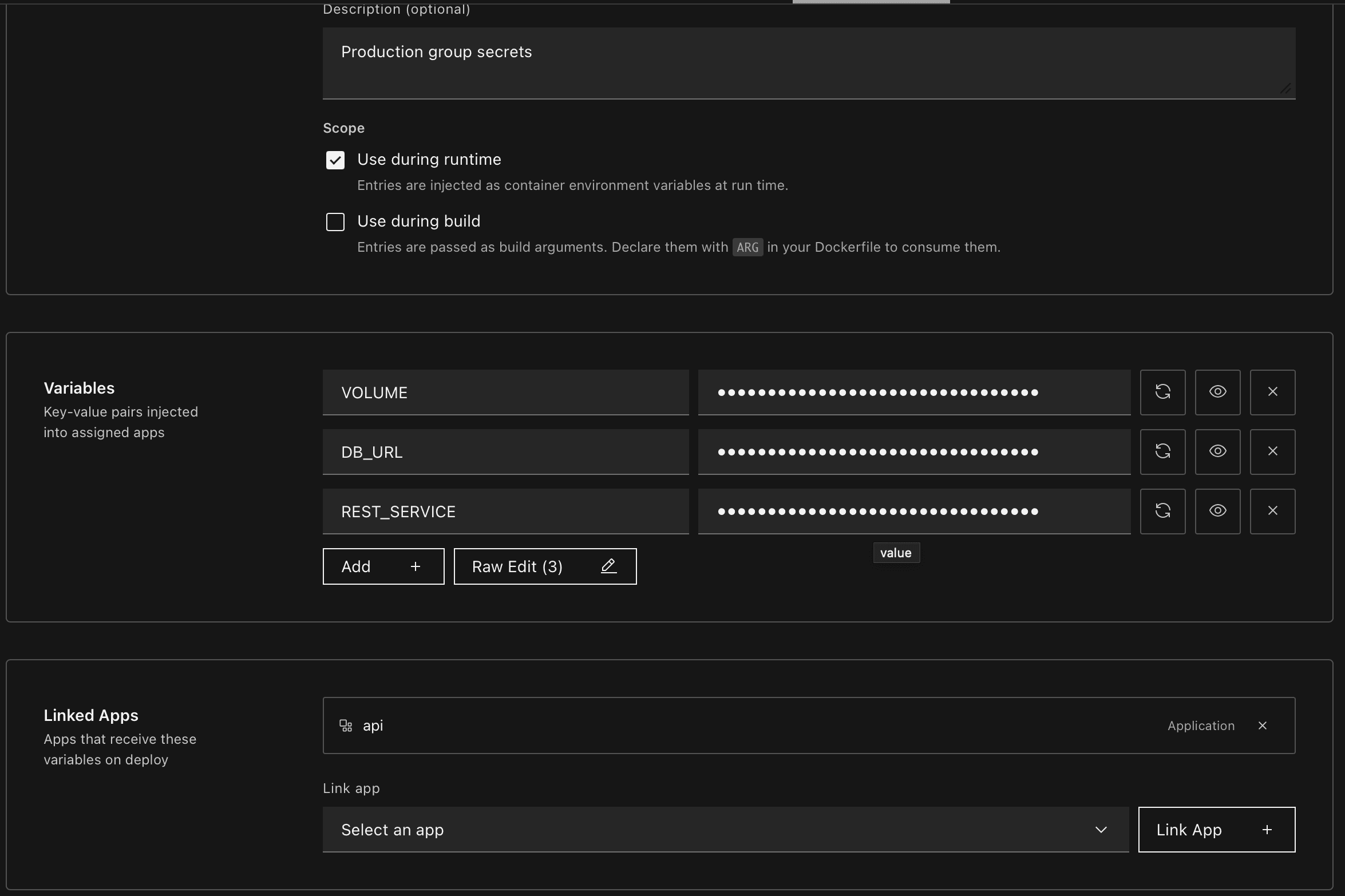
Stop copy-pasting the same env vars across apps. Environment Variable Groups let you define shared configuration once at the team level, then link the group to any app that needs it.

Environment Variable Groups

Define once, link anywhere

Create a named group (e.g. prod-secrets, observability-keys, feature-flags) with a set of key/value pairs, then link it to one or many apps in your team. Edit a value in the group and every linked app picks it up on the next deploy — no more hunting down which app has which variable set.

Runtime, build, or both

Each group carries a scope that decides where entries land:

  • Use during runtime — entries are injected as container environment variables at run time
  • Use during build — entries are passed as build arguments; declare them with ARG in your Dockerfile to consume them

Pick one or both per group, so the same key can feed a BuildKit arg and a runtime env when you need it.

Predictable conflict rules

App-local variables always win over group values on the same key — so an app can carve out a narrow override without forking the whole group. When multiple groups define the same key, the most recently linked group wins, deterministically.

Where to start

Head to Settings → Environment Groups to create your first group. Open any app's Environment tab to link groups from the team pool.

NEW FEATURE

IP Access Profiles

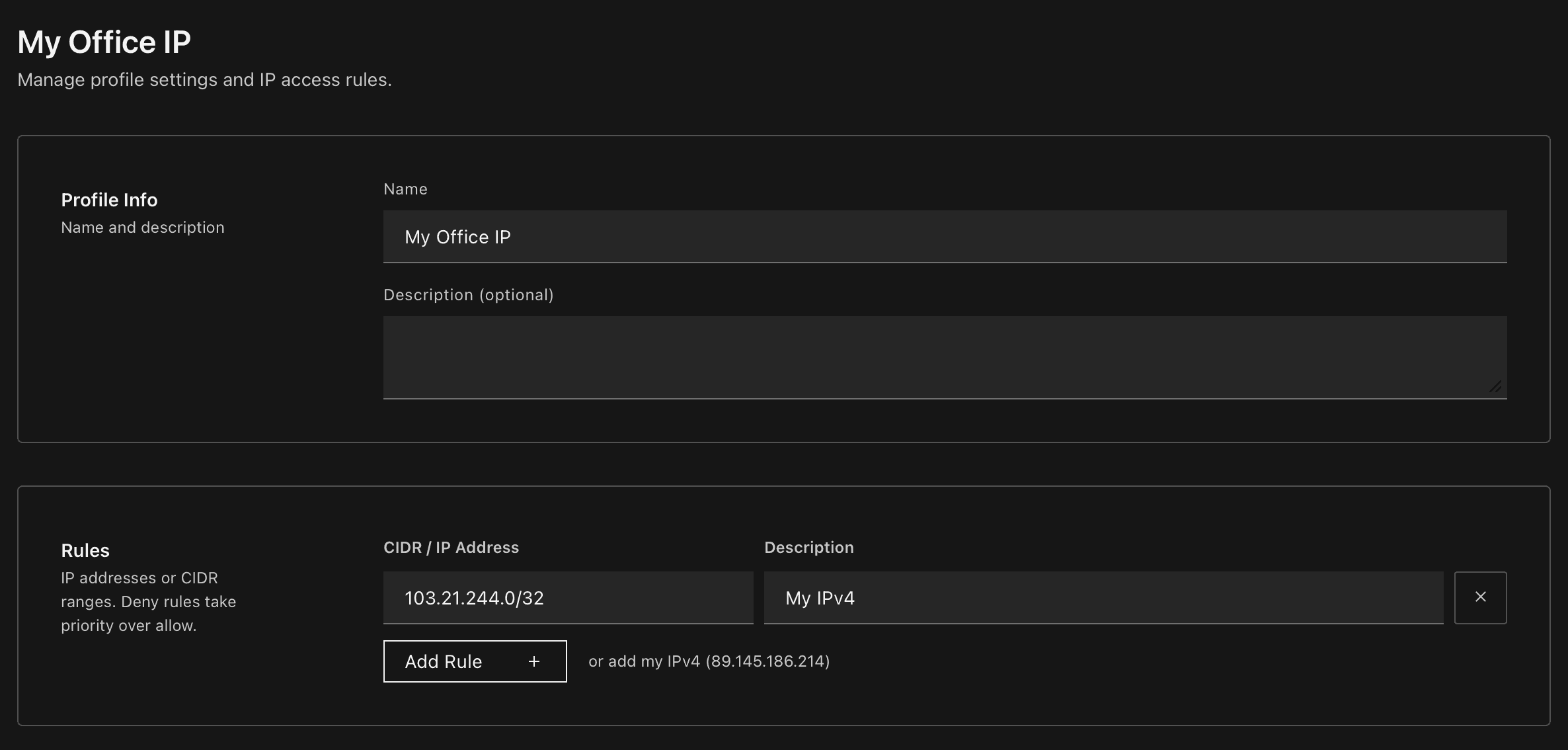
Control who can reach your applications with IP Access Profiles — reusable CIDR allowlists you can attach to one or more apps.

IP Access Profiles

Create once, assign anywhere

Define a named profile (e.g. Office Network, VPN Gateway) with a list of allowed CIDR ranges, then attach it to any app in your team. One profile can protect multiple apps, and any app can combine multiple profiles — rules are merged automatically.

10.0.0.0/24        Office LAN
203.0.113.42/32    VPN exit
2a02:ff0::/32      IPv6 prefix

IPv4 and IPv6, one click away

The profile editor auto-detects both your IPv4 and IPv6 addresses and offers a one-click link for each — add whichever (or both) your network uses.

Works on every domain

The same profile enforces the same rules on platform domains (*.outplane.app) and on custom domains you've mapped to your app — no extra configuration.

Head to Settings → IP Access to create your first profile, then open any app's Network tab to assign it.

NEW FEATURE

Build Filters

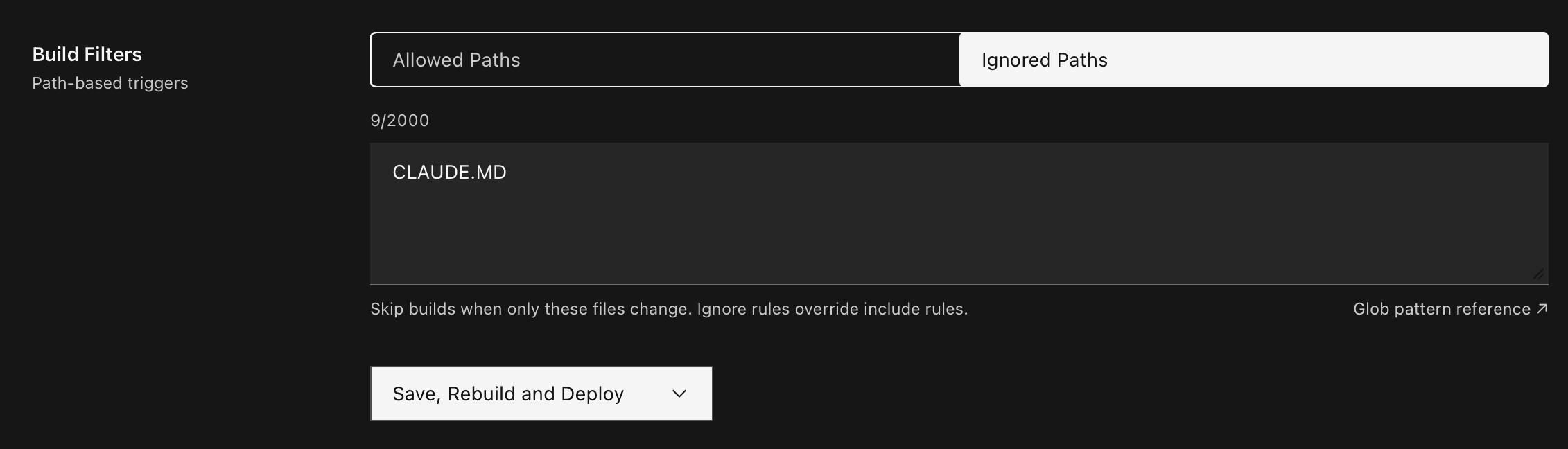
Control which file changes trigger a new build with path-based build filters — define allowed and ignored paths using glob patterns directly from your build settings.

Build Filters

Allowed paths

Restrict builds to only trigger when files matching specific patterns change. One glob pattern per line.

src/**
package.json
Dockerfile

Ignored paths

Skip builds when only certain files change. Ignore rules take precedence over include rules.

docs/**
*.md
.github/**

How it works

  • Allowed Paths — Only changes to files matching these patterns will trigger a build. Leave empty to allow all paths.
  • Ignored Paths — Changes to files matching these patterns will never trigger a build, even if they match an allowed path.
  • Patterns follow standard glob syntax** for recursive matching, * for single-level wildcards.

Navigate to Applications → Settings → Build to configure build filters for your application.

NEW FEATURE

Private Container Registry Support

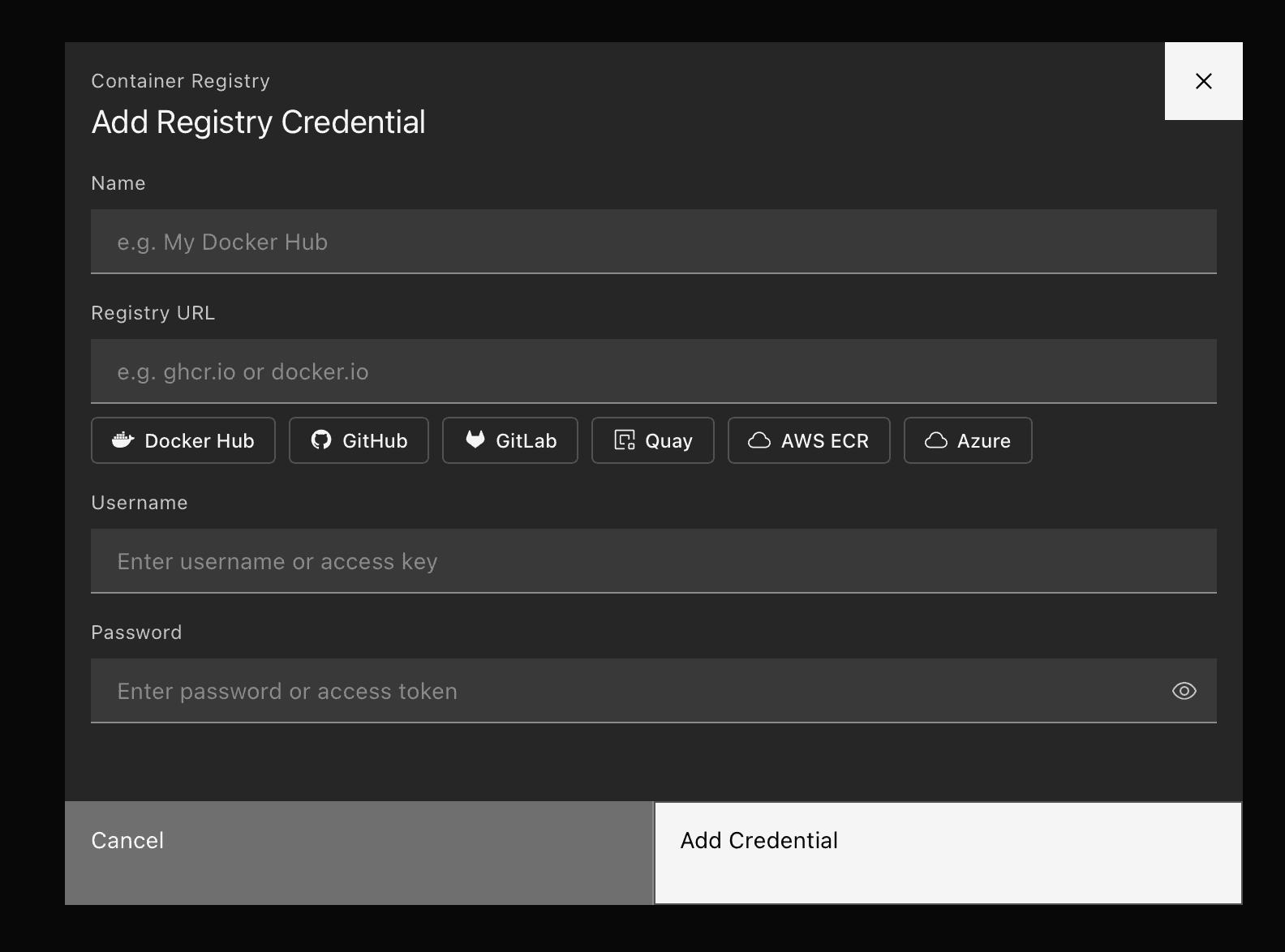
Deploy from private container registries with secure credential management — store registry credentials at the team level and select them when creating applications from Docker images.

Add Registry Credential

Registry credentials

  • Team-level management — Add, view, and delete registry credentials from Settings. Each credential stores a name, registry URL, username, and password.
  • Provider presets — Quick-fill buttons for Docker Hub, GitHub Container Registry, GitLab, Quay, AWS ECR, and Azure Container Registry. Click a preset to auto-populate the registry URL.
  • Secure storage — Passwords are stored securely and never returned in API responses.

Create app integration

  • Credential selector — A dropdown next to the image name input lets you pick a saved credential or deploy without authentication.
  • Automatic image path resolution — When a credential is selected, OutPlane resolves the full image path based on what you enter:
    • nginx:latestghcr.io/username/nginx:latest
    • username/myapp:v1ghcr.io/username/myapp:v1
    • ghcr.io/username/myapp:v1 → unchanged
  • Manage credentials link — Jump directly to Settings from the credential dropdown to add new credentials without leaving the flow.

Supported registries

Any Docker-compatible registry works. Built-in presets for:

  • Docker Hub (docker.io)
  • GitHub Container Registry (ghcr.io)
  • GitLab Container Registry (registry.gitlab.com)
  • Quay (quay.io)
  • AWS ECR (.dkr.ecr..amazonaws.com)
  • Azure Container Registry (.azurecr.io)

Getting started

Navigate to Settings → Registry Credentials to add your first credential, then create a new application using the Docker Image source and select your credential from the dropdown.

Open Console →

NEW FEATURE

Dockerfile Auto-Detection

Create applications faster with automatic Dockerfile detection — ports, environment variables, and Dockerfile content are now parsed and pre-filled when you connect a repository.

How it works

  • Automatic parsing — When you select a repository and branch, OutPlane reads your Dockerfile and extracts EXPOSE ports and ENV variables.
  • Pre-filled configuration — Detected ports replace the default configuration, and environment variables are populated automatically.
  • Dockerfile preview — View the detected Dockerfile content directly in the create app form with syntax highlighting and copy support.
  • Root directory aware — If your Dockerfile lives in a subdirectory, detection adjusts based on the selected root directory path.
  • Not found warning — When no Dockerfile is detected, a clear warning is shown and deployment is blocked until resolved.

Supported sources

  • Git Provider — Private repositories connected via GitHub App.
  • Public Repo — Any public GitHub repository URL.

Docker Image and Template sources are unaffected — they continue to work as before.

Getting started

Navigate to Applications, click Create Application, select your repository and branch. The Dockerfile configuration is detected automatically — review the pre-filled ports and environment variables, then deploy.

Open Console →

NEW FEATURE

Managed Redis

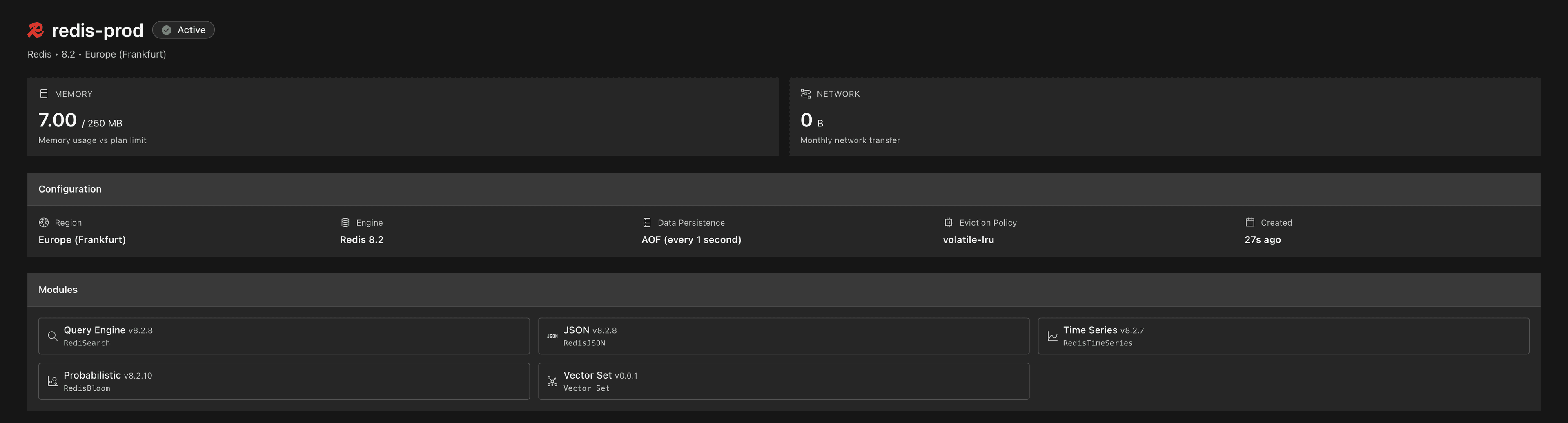
Provision and manage Redis databases directly from your OutPlane console — powered by Redis Cloud.

Redis Database Overview

What's included

  • One-click provisioning — Spin up a production-ready Redis instance in seconds.
  • RedisInsight built-in — Launch RedisInsight directly from your console to browse keys, monitor performance, and debug queries.
  • Connection strings — Ready-to-use connection details for your applications.
  • Module support — RedisJSON, RediSearch, RedisTimeSeries, and RedisBloom available out of the box.
  • Persistence — Data durability with configurable persistence policies.
  • Status tracking — Real-time provisioning status and health monitoring in your dashboard.

Use cases

  • Session storage — Fast, reliable session management for your web applications.
  • Caching layer — Reduce database load with in-memory caching.
  • Pub/Sub messaging — Real-time communication between your services.
  • Rate limiting — Protect your APIs with Redis-backed rate limiters.
  • Queues — Lightweight job queues without additional infrastructure.

Getting started

Navigate to Databases in your console, click Create Database, select Redis from the provider switcher, and choose your preferred plan and region.

Open Console →

Other improvements

  • Dynamic pod filtering in logs — Filter application logs by specific pod instances for faster debugging.
  • Billing accuracy — Improved billing calculations to correctly account for replica counts.
NEW FEATURE

Application Metrics & Monitoring

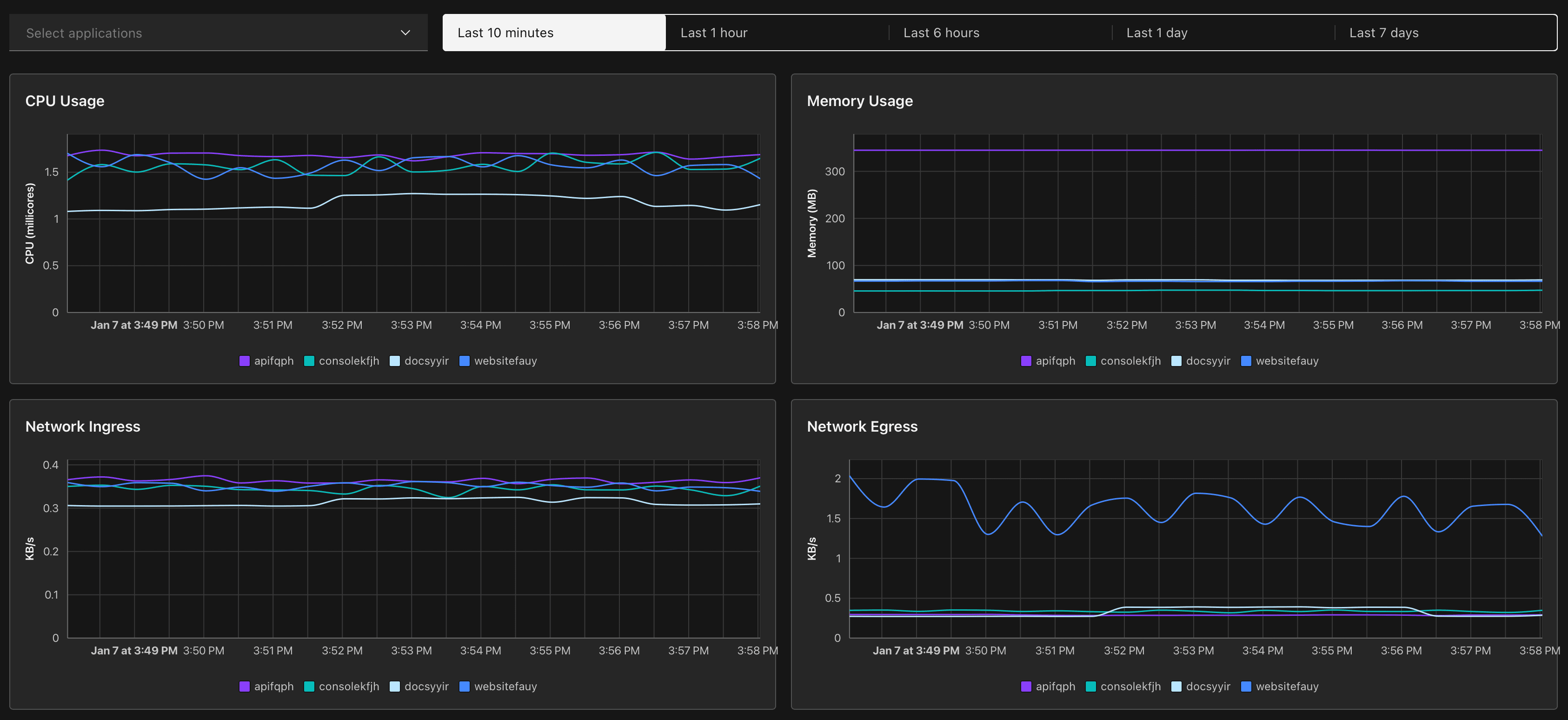
Track your application performance with real-time metrics — now available in the OutPlane console.

Metrics Dashboard

What's included

  • CPU & Memory monitoring — Visualize resource usage with interactive charts.
  • Time range selection — Analyze metrics from the last hour to 7 days.
  • Application selector — Switch between your deployed services instantly.
  • Responsive charts — Optimized layouts for desktop and mobile viewing.
  • API integration — Metrics data powered by our new Metrics API.

Charts available

  • CPU utilization over time
  • Memory usage trends
  • Network Ingress (incoming traffic)
  • Network Egress (outgoing traffic)

Getting started

Navigate to Observability > Metrics in your console and select your application to start monitoring.

Open Metrics →

NEW FEATURE

PostgreSQL Database Management

Create and manage PostgreSQL databases directly from your OutPlane console — powered by Neon's serverless infrastructure.

What's included

  • One-click provisioning — Spin up a new PostgreSQL database in seconds.
  • Auto-scaling compute — Scale from 0.25 to 56 compute units based on demand.
  • Connection strings — Get ready-to-use connection strings for psql, Node.js, .NET, and Java.
  • Roles & databases — Create and manage database roles and schemas.
  • Usage metrics — Monitor compute time, storage, and data transfer in real-time.
  • Network controls — Restrict access with IP allowlists.

Supported regions

Deploy your database close to your users:

  • US East (N. Virginia, Ohio)
  • US West (Oregon)
  • Europe (Frankfurt, London)
  • Asia Pacific (Singapore, Sydney)
  • South America (São Paulo)

Getting started

Navigate to Databases in your console, click Create Database, and select your preferred region and PostgreSQL version.

Open Console →

NEW FEATURE

Pricing Calculator

Introducing the Pricing Calculator — estimate your monthly infrastructure costs before you deploy.

Features

  • Service Catalog — Browse all available services organized by category: Compute, Database, Storage, Network, and DevOps.
  • Real-time Estimates — See cost projections update instantly as you configure resources.
  • Multiple Services — Add multiple instances of App Service, Database, and usage-based services to your estimate.
  • Usage-based Pricing — Calculate costs for bandwidth, storage, build minutes, and more with free tier included.
  • Export & Share — Get a clear summary of your estimated monthly costs.

Available Services

Compute

  • App Service — Deploy web applications with flexible instance sizes from 0.5 to 32 vCPU.

Database

  • Managed Database — PostgreSQL, MySQL, and MongoDB with automated backups.

Storage & Network

  • Block Storage — 20 GB included free, then $2 per 100 GB.
  • Bandwidth — 1000 GB included free, then $2 per 1000 GB.
  • Load Balancer — Distribute traffic across instances.
  • Custom Domains — Map your own domains with automatic SSL.

DevOps

  • Build Minutes — 300 minutes included free, then $2 per 60 minutes.
  • Container Registry — Store and manage Docker images.

Try it now

Open Pricing Calculator →

v1.0.0NEW FEATURE

Introducing OutPlane

We're excited to announce OutPlane — a modern cloud platform built for developers who want to ship faster.

What's included

  • Git-based deployments — Push to deploy. Every commit triggers a build.
  • Preview environments — Every pull request gets its own URL.
  • Scale to zero — Pay only when your app is running. Serverless by default.
  • Managed databases — PostgreSQL, MySQL, MongoDB, and Redis ready in seconds.
  • Automatic HTTPS — SSL certificates provisioned and renewed automatically.
  • Real-time logs — Stream logs from your applications instantly.
  • Environment variables — Securely manage secrets across environments.

Getting started

Connect your GitHub repository and deploy your first application in under a minute.

Get started →

v1.1.0NEW FEATURE

Scale to Zero

Your applications can now scale to zero when not in use — and wake up instantly on the next request.

How it works

  • No traffic? No cost. Resources spin down automatically.
  • First request wakes your app in milliseconds.
  • Configure idle timeout per application.

Use cases

  • Development and staging environments
  • Webhooks and scheduled jobs
  • Low-traffic APIs and side projects

Enable it from your application settings under Scaling.

v1.2.0NEW FEATURE

Usage Quotas & Billing

You can now view and manage your usage quotas directly from the dashboard.

What's new

  • See current usage across compute, storage, and bandwidth.
  • Track quota limits in real-time.
  • Visual indicators when approaching limits.

Need more?

Head to Settings → Billing and contact us to increase your quotas. We'll get back to you within 24 hours.

17 updates


Start deploying in minutes

Connect your GitHub repository and deploy your first application today. $20 free credit. No credit card required.